Pages

Creating Multiple Messages in a BizTalk Server disassemble pipeline component

Wednesday, September 14, 2011
There is a interface IBaseMessageFactory that you can use to create instances of BizTalk messages and BizTalk message parts.

You can grab a handle to an instance of a subtype of this interface from within the Dissassemble method using the IPipelineContext.GetMessageFactory().

An important thing to note is that in order to preserve the message context you must grab this from the original message and poke it into the new instances created by the factory. The following code illustrates it.


public void Disassemble(Microsoft.BizTalk.Component.Interop.IPipelineContext pc, Microsoft.BizTalk.Message.Interop.IBaseMessage inmsg)
{
IBaseMessageContext sourceContext = inmsg.Context; IBaseMessagePart part = inmsg.BodyPart;
// queue four messages to be processed in the GetNext() method.
// _msgs is a simple Queue
_msgs.Enqueue(CreateMessage(pc, sourceContext,part));
}

private string messageType = @"http://www.myschema.com/schemas/myschemamessage/MySchema";
private string systemPropertiesNamespace = @"http://schemas.microsoft.com/BizTalk/2003/system-properties";

public IBaseMessage CreateMessage(IPipelineContext pc, IBaseMessageContext sourceContext, IBaseMessagePart part)
{
IBaseMessage msg = pc.GetMessageFactory().CreateMessage();
msg.AddPart("Body", part, true);
// comment out the following line to preserve the original message
msg.BodyPart.Data = new MemoryStream(ASCIIEncoding.ASCII.GetBytes("blah blah blah"));
msg.Context = sourceContext; msg.Context.Promote("MessageType", systemPropertiesNamespace, messageType);
return msg;
}
 
 
By James Mann
Read more ...

Debathing File Document Schemas and Envelop Schema in Biztalk

Wednesday, September 14, 2011

What is debatching?
Suppose you are receiving a BizTalk Message  that contains multiple records. In order to process the message and update or send to particular system (DB or any other Application) we need to process this message individually this process called debatching in BizTalk.
How BizTalk helps ?
In BizTalk  using Envelope Schema, Document schema we can process or break a message  individually .
Steps Needed to Achieve this.
1) First Create document schema which has all the elements of the XML  message. and call this schema as Contact.XSD
  Here I am going to use The following XML Message
<Name>Sreeni</Name> 
<Age>35</Age> 
<Email>sragavan@hotmail.com</Email>
<Name>Gandhi</Name> 
  <Age>35</Age> 
  <Email>Gandhi@india.com</Email>
2) Create Envelope schema and name it  Contacts
image
Now select Schema node in newly created schema and set Envelope Property to  "YES" as shown above.
Now we need to Import Contact Document schema into Envelope schema.
image
image
Now add child record and name it Contact and change the  Data structure type to  Contact as shown below.

image
Now  change the Body Xpath  to /*[local-name()='Contacts' and namespace-uri()='http://XmlDebatching.ContactsEnvelope']
Step 3:
Now create custom Receive Pipeline with XML Disassembler  as shown below.
and Change the document schema to Contact.XSD and  Envelope schema to ContactsEnvelop.XSD.

image
finally Add Strong Name key file to the project and Deploy into BizTalk Message DB.
Create  Receive Port with the custom pipeline we created and Send port with  Filters  and  test the application.
Now drop the  Contacts.XML in  Receive Location  and BizTalk Read the message and Split into individual messages as shown here.
image
image

image
Read more ...

How To Expose / Promote the BTS ReceiveLocationName Property in Message Context Of a Biztalk Message

Wednesday, September 14, 2011
Post by Evan Aussenberg

There are some BizTalk properties that are not exposed in any property schemas from BTS 2006 R2. If your development project is such that you can add a new property schema or add a new BizTalk project then it is possible to access these properties from an orchestration. Because they are context properties they are not available for routing. 

One such property is the ReceiveLocationName property. While the ReceivePortName property is available in the BTS namespace the ReceiveLocationName property is not. Therefore, this syntax from an example orchestration expression shape results in a compile time error:  strReceiveLocation = myMsg(BTS.ReceiveLocationName); 
ReceiveLocationName Property 

We can easily see the ReceiveLocationName property in messages that come into BizTalk. The question is how to get its value into an orchestration? 


Code Example 

As you probably know, property values are identified by the property target namespace and property name. We won't ultimately use the following code, but for demonstration purposes in a custom pipeline component we can assess a property value by coding something like this: 

// Namespace of the property // string sysNamespace =      "http://schemas.microsoft.com/BizTalk/2003/system-properties"; 
  
// Or instead of hard coding the namespace: // Assuming the property namespace for ReceivePortName is the same // for ReceiveLocationName: // BTS.ReceivePortName BTSPropReceivePortName = new BTS.ReceivePortName(); sysNamespace = BTSPropReceivePortName.Name.Namespace;    // Assign the receive location name // string receiveLocationName =      pInMsg.Context.Read("ReceiveLocationName", sysNamespace); 
You can see from the last line of code from above, that to retrieve a message property requires nothing more than knowing the property name and the property target namespace. 
Adding a Property Schema 

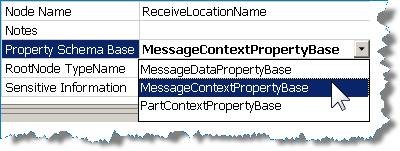
As far as BTS message properties go, they can be assigned Property Schema Base types of MessageDataPropertyBase (default) orMessageContextPropertyBase. MessageDataPropertyBase means that the XPath to the property value in the message must exist. A MessageContextPropertyBase property means that the XPath may or may not exist. 
Taking this information into account we can expose the RecieveLocationName using the following steps. Note steps 1 – 4 are just suggestions.
1. Create a property schema, and perhaps create a new BizTalk project.
2. Add a new property schema. Let’s call it “schBTSExtra.xsd”.
3. Change the namespace of the .NET schema type to “BTSExtra”. This is just a shortened namespace similar to the “BTS” namespace in the Microsoft.BizTalk.GlobalPropertySchemas assembly.
4. Open the new schema if it is not already opened.
5. Change the name of Property1 (it was added by default when creating the new property schema) to ReceiveLocationName.
6. Set the Property Schema Base to MessageContextPropertyBase.
7. Highlight the “Schema” node and change the schema’s Target Namespace to 
http://schemas.microsoft.com/BizTalk/2003/system-properties
8. Compile the project.
Property Schema Example 
That’s all there is to it… now in your orchestration after referencing the new schema project (or you added this schema directly to your orchestration project) you can use an expression such as:
// Trace output from an orchestration expression shape // traceMsg = purchaseOrder(BTSExtra.ReceiveLocationName); if (traceMsg == null) {     traceMsg = "<null>"; } System.Diagnostics.Trace.WriteLine("Receive Location Name: " + traceMsg);
Here is the result when testing my own orchestration: 


External Links from MSDN

Read more ...

Routing Message Through Recieve Locations Using Filters in Biztalk

Wednesday, September 14, 2011
Q

Hi
I have a situation where I need one receive port with two receive locations. Which is not a problem.
E.g. ReceivePort 1 / ReceiveLocationA & ReceiveLocationB
However I need to send all files that are received by ReceiveLocationB to a specific directory.
Therefore i have created a send port with a filter on it. But there does'nt appear to be a filter for BTS.ReceiveLocationName. There is for ReceivePortName, but this would pick up files from both receive locations.
Any help would be much appreciated.

Sol:
The idea of having multiple receive locations in a receive port is to receive messages from multiple locations and treat them in the same way in BizTalk. But your requirement is to put the messages into separate directories. You can easily do this by using two receive ports and each having only one receive location. Now you can create  two send ports with filters set for corresponding receive ports via BTS.ReceivePortName. Hope this helps.
  • Create two receive ports with their own receive locations
  • If using different adapters, use adapter specific properties to identify
  • Promote a custom property and route on that


or You can also  try setting the filter as  BTS.InboundTransportLocation == "C:\test\in\*.*"

or

A solution is to create a custom pipeline component that writes and promotes properties. Jon Flanders has created a good generic component to do this: the ContextAdder Pipeline Component (downloable from his blog). You can through promoted property route it to send port. HTH
Regards,
Also

Check this great post by Evan Aussenberg: How To Expose the BTS ReceiveLocationName Property

Read more ...

BizTalk Host Inflight Message Throttling Resource Based Throttling Settings

Friday, September 9, 2011
Q:

Hi there,
I am stress testing our future production environment based on BizTalk Server 2010, and I am getting this error BizTalk host throttled because InflightMessageCount exceeded the configured throttling limit
Does any one know about what parameter affects the inflightMessageCount, or at least what does this parameter mean?
Regards,

Sol:
See the description of Inflight message here
Specify the reaction time of throttling when the value for In-process messages exceeds the threshold. This is specified in percentage value and this parameter sets the severity of a throttling condition caused when the value for In-process messages threshold is exceeded.

Read more ...