Pages

Showing posts with label XML. Show all posts

Fix Huge Maps in BizTalk - change default behavior - Undocumented Fix

Wednesday, June 5, 2013
post by Brett
I have been working with several industry standard Xml schema definitions, specifically those defined by the UBL standard by OASIS (www.oasis-open.org).  This organisation has a worthwhile, yet lofty, goal of defining a set of document standards that will cover the majority of communication needs for B2B.
The result of trying to be all things to all men is that the schemas defined are big.  Like really, REALLY big, with a set of included schema file that run about 8-10 deep.
The problem with this, in the BizTalk world, is when you either generate an instance document from the schema, or attempt to map a document to a UBL schema document using the BizTalk Mapper.  Due to the way the BizTalk handles default nodes, you end up with all default values being output into the destination document.
A quick, undocumented fix for this is to change the GenerateDefaultFixedNodes setting in the BizTalk Map.  Where is this setting, you ask?
Open the .btm file using the “XML Editor”, rather than the default “BizTalk Mapper” (i.e. right-click, choose “Open With…”, then XML Editor).  The root node of the map document is called “mapsource”, one of the attributes is called “GenerateDefaultFixedNodes”.  Change this from “Yes” to “No”, save and close, and you’re done.
This undocumented trick brought one of our generated XSLT transforms down from a slightly ridiculous 50 Mb to an easily handled 11 Kb, and the transform execution time from 20 seconds down to about the 50 millisecond mark (on a virtual machine)
Read more ...

BizTalk : How To : Configure the Destination System for Log Shipping

Thursday, April 11, 2013

How to Configure the Destination System for Log Shipping

1.     On the computer or computers that you have identified as the destination system, click Start, click Programs, click Microsoft SQL Server 2005, and then click SQL Server Management Studio.
2.     In the Connect to Server dialog box, specify the name of the SQL Server on the destination computer, and then click Connect to connect to the appropriate SQL Server.
3.     In Microsoft SQL Server Management Studio, click File, click Open, and then click File.
4.     In the Open File dialog box, browse to the following SQL script:
%SystemRoot%\Program Files\Microsoft BizTalk Server 2006\Schema\LogShipping_Destination_Schema.sql
5.     Click the Query menu, and then click Execute.
The LogShipping_Destination_Schema drops and recreates the tables used for restoring the source databases on the destination system. This includes tables to store the list of databases being recovered, copies of the backup history imported from the source system's BizTalkMgmtDb database, and information about SQL Server Agent jobs configured to run against the source databases.
6.     In Microsoft SQL Server Management Studio, click File, click Open, and then click File.
7.     In the Open File dialog box, browse to the following SQL script:
%SystemRoot%\Program Files\Microsoft BizTalk Server 2006\Schema\LogShipping_Destination_Logic.sql
8.     Click the Query menu, and then click Execute.
9.     On the computer or computers you have identified as the destination system, click Start, click Programs, click Microsoft SQL Server 2005, and then click SQL Server Management Studio.
10.  In the Connect to Server dialog box, specify the name of the SQL Server on the destination computer, and then click Connect to connect to the appropriate SQL Server.
11.  In Microsoft SQL Server Management Studio, click New Query.
12.  In the query window paste the following command:
exec bts_ConfigureBizTalkLogShipping @nvcDescription = '<MyLogShippingSolution>',
@nvcMgmtDatabaseName = '<BizTalkServerManagementDatabaseName>',
@nvcMgmtServerName = '<BizTalkServerManagementDatabaseServer>',
@SourceServerName = null, -- null indicates that this destination server restores all databases
@fLinkServers = 1 -- 1 automatically links the server to the management database

13.  In the command, replace <MyLogShippingSolution> with a meaningful description, surrounded by single quotes. Replace <BizTalkServerManagementDatabaseName> and <BizTalkServerManagementDatabaseServer> with the name and location of your source BizTalk Management database, surrounded by single quotes.

Description: http://i.msdn.microsoft.com/Aa560961.Important(en-us,MSDN.10).gifImportant
Before you execute this statement, you must enable the Ad Hoc Distributed Queries configuration option on the destination system.
Description: http://i.msdn.microsoft.com/Aa560961.note(en-us,MSDN.10).gifNote
If you have more than one source server, you can restore each source server to its own destination server. On each destination server, in the @SourceServerName = null parameter, replace null with the name of the appropriate source server, surrounded by single quotes (for example, @SourceServerName = 'MySourceServer',).

14.  Click the Query menu, and then click Execute.
Description: http://i.msdn.microsoft.com/Aa560961.Important(en-us,MSDN.10).gifImportant
if the query fails, after you fix the problem with the query, you must start over from step 1 of this procedure to reconfigure the destination system.
Description: http://i.msdn.microsoft.com/Aa560961.note(en-us,MSDN.10).gifNote
The restore jobs on the destination system will attempt to recreate the log and data files for each restored database in the same location as they existed on the source database server.

15.  On the destination system, in SQL Server Management Studio, double-click the appropriate server, double-click SQL Server Agent, and then double-click Jobs.
16.  In the details pane, you will see three new jobs:
·         BTS Log Shipping Get Backup History
The BizTalk Server Log Shipping Get Backup History job moves backup history records from the source to the destination. It is scheduled by default to run every minute. This job runs as frequently as possible in order to move history records from the source to the destination. In the event of a system failure to the source system, the server that you identified as the destination system will continue to process the history records that have already been imported.
·         BTS Server Log Shipping Restore Databases
The BizTalk Server Log Shipping Restore Databases job restores backup files for the given databases for the source to the destination server. It is scheduled by default to run every minute. This job runs continuously without completing as long as there are backup files to restore. As an extra precaution, you can run this job an additional time to ensure that it is complete.
·         BTS Log Shipping Restore To Mark
The BizTalk Server Log Shipping Restore To Mark job restores all of the databases to a mark in the last log backup. This ensures that all of the databases are in a transactionally consistent state. In addition, this job re-creates all of the SQL Server Agent jobs on the destination system that had been on the source system.

Description: http://i.msdn.microsoft.com/Aa560961.Important(en-us,MSDN.10).gifImportant
You should monitor these jobs to ensure that they do not fail.

17.  On a computer running BizTalk Server 2006, browse to the following folder: %SystemRoot%\Program Files\Microsoft BizTalk Server 2006\Schema\Restore.

Description: http://i.msdn.microsoft.com/Aa560961.note(en-us,MSDN.10).gifNote
On 64-bit computers, browse to the following folder: %SystemRoot%\Program Files (x86)\Microsoft BizTalk Server 2006\Bins32\Schema\Restore.

18.  Right-click SampleUpdateInfo.xml, and then click Edit.
19.  Replace all instances of "SourceServer" with the name of the source system, and then replace all instances of "DestinationServer" with the name of the destination system.

Description: http://i.msdn.microsoft.com/Aa560961.Important(en-us,MSDN.10).gifImportant
Include the quotation marks around the name of the source and destination systems.
Description: http://i.msdn.microsoft.com/Aa560961.note(en-us,MSDN.10).gifNote
If you renamed any of the BizTalk Server databases, you must also update the database names as appropriate.
Description: http://i.msdn.microsoft.com/Aa560961.note(en-us,MSDN.10).gifNote
If you have configured BAM, you must add two more lines in OtherDatabases section of the SampleUpdateInfo.xml file for the BAMAlertsApplication and BAMAlertsNSMain databases. If you changed the default name for these two databases, please use the actual database names.
<Database Name="BAM Alerts Application DB" oldDBName="BAMAlertsApplication" oldDBServer="SourceServer" newDBName=" BAMAlertsApplication" newDBServer="DestinationServer"/>
<Database Name="BAM Alerts Instance DB" oldDBName="BAMAlertsNSMain" oldDBServer="SourceServer" newDBName="BAMAlertsNSMain" newDBServer="DestinationServer"/>

21.  If you have more than one MessageBox database in your BizTalk Server system, add another MessageBoxDB line to the list, and then set IsMaster="0" for the non-master databases.
22.  If you are using BAM, HWS, or the Rules Engine, EDI, uncomment these lines as appropriate.
23.  If you have any custom databases, add them as appropriate under the <OtherDatabases> section. For more information, see How to Back Up Custom Databases.
24.  When you are finished editing the file, save it and exit.

Read more ...

BizTalk : How To : Call .Net Component inside Biztalk mapper using XSLT call template PART 2

Wednesday, March 27, 2013
post by  Richard Seroter

A problem I mentioned was that the member variable in the class that the map was calling seemed to be getting shared amongst execution instances. Each map creates a sequential page number in the XSLT and puts it into the destination XML. However, I’d see output where the first message had pages “1..3..5..7..8″ and the second message had pages “2..4..6..9.” Very strange. I thought I fixed the problem, but it surfaced today in our Test environment.
So, I set out to keep everything local to the map and get rid of external assembly calls. After banging my head for a few minutes, I came up the perfect solution. I decided to mix inline script with inline XSLT. “Madness” you say? I built a small test scenario. The map I constructed looks like this:
In the first Scripting functoid, I have “inline C#” selected, and I created a global variable. I then have a function to increment that variable and return the next number in sequence.
Did you know that you could have “global variables” in a map? Neat stuff. If I check out the XSLT that BizTalk generates for my map, I can see my function exposed as such:
Now I know how to call this within my XSLT! The second Scripting functoid’s inline XSLT looks like this:

Notice that I can call the C# method written in the previous functoid with this code:
<xsl:value-of select=”userCSharp:GetPageNumber()”/>
The “prefix” is the auto-generated one from the XSLT. Now, all the calculations are happening locally within the map, and not relying on outside components. The result of this map is a document that looks like this:
There you go. Using global variables within a BizTalk map and calling a C# function from within the XSLT itself.
Read more ...

BizTalk : How To : Call .Net Component inside Biztalk mapper using XSLT call template PART 1

Tuesday, March 26, 2013

post by  Richard Seroter
I encountered a particularly tricky multi-part mapping scenario. I had to build a destination message that contained groupings from the two source messages. Each record in the first source message created a destination node, and each record in the second source message created a destination node directly beneath the related first source record. To make matters tougher, every destination record has an attribute containing a sequential number. So out of this …
<source1>
  <Node1><Node1>
  <Node2></Node2>
</source1>
<source2>
  <NodeRelatedToNode1></NodeRelatedToNode1>
  <NodeRelatedToNode1></NodeRelatedToNode1>
  <NodeRelatedToNode2></NodeRelatedToNode2>
</source2>
The destination was supposed to look like this …
<destination>
  <Node1 page=”1″><Node1>
  <NodeRelatedToNode1 page=”2″></NodeRelatedToNode1>
  <NodeRelatedToNode1 page=”3″></NodeRelatedToNode1>
  <Node2 page=”4″></Node2>
  <NodeRelatedToNode2 page=”5″></NodeRelatedToNode2>
</destination>
The grouping part wasn’t too tough, just used a Scripting functoid with the XSLT Call Templateand a little hand written XSL. The hard part was creating the sequential “page” numbers. Those familiar with XSLT know that the “variables” in XSLT are basically constants, so you can’t create a variable and increment it. I considered building some sort of recursion to get my incremented number, but in the end, decided to call a custom .NET component from my map’s XSLT. I built a C# component that had a member variable, and a method called “GetNext()” which incremented and then returned the next sequential number. I then set my map’s Custom Extension XML to an XML document referencing my custom component. Now in my XSLT Call Template I could get the next “page” number each time I built a destination node. Neat!
See here for an example of doing this.
Here’s where a “quirk” was introduced. When I deployed this map, and ran multiple documents through it, the first document had it’s paging correct (e.g. pages 1-5), but the next messages had the wrong values (e.g. 6-10, 11-16, etc). What was happening was that somehow this custom C# component was being shared! The “increment” kept counting on each orchestration call! My C# component wasn’t built as a “static” object, and I assumed that the scope of each custom object was the individual map (or orchestration) instance.
I still have no idea why this happened, but to ensure it wouldn’t keep happening, I added a method to the custom component called “Reset()” which set the counter to 0. Then at the top of the map I call out to that method to ensure that each map starts its counter at 0.
Read more ...

BizTalk : How To : Map Repeating Sequence Elements

Friday, March 22, 2013
source: paul petrov


Repeating sequence groups can often be seen in real life XML documents. It happens when certain sequence of elements repeats in the instance document. Here's fairly abstract example of schema definition that contains sequence group:
<xs:schema xmlns:b="http://schemas.microsoft.com/BizTalk/2003"
           xmlns:xs="http://www.w3.org/2001/XMLSchema"
           xmlns="NS-Schema1"
           targetNamespace="NS-Schema1" >
  <xs:element name="RepeatingSequenceGroups">
    <xs:complexType>
      <xs:sequence maxOccurs="1" minOccurs="0">
        <xs:sequence maxOccurs="unbounded">
          <xs:element name="A" type="xs:string" />
          <xs:element name="B" type="xs:string" />
          <xs:element name="C" type="xs:string" minOccurs="0" />
        </xs:sequence>
      </xs:sequence>
    </xs:complexType>
  </xs:element>
</xs:schema>
And here's corresponding XML instance document:
<ns0:RepeatingSequenceGroups xmlns:ns0="NS-Schema1">
  <A>A1</A>
  <B>B1</B>
  <C>C1</C>
  <A>A2</A>
  <B>B2</B>
  <A>A3</A>
  <B>B3</B>
  <C>C3</C>
</ns0:RepeatingSequenceGroups>
As you can see elements A, B, and C are children of anonymous xs:sequence element which in turn can be repeated N times. Let's say we need do simple mapping to the schema with similar structure but with different element names:
<ns0:Destination xmlns:ns0="NS-Schema2">
  <Alpha>A1</Alpha>
  <Beta>B1</Beta>
  <Gamma>C1</Gamma>
  <Alpha>A2</Alpha>
  <Beta>B2</Beta>
  <Gamma>C2</Gamma>
</ns0:Destination>
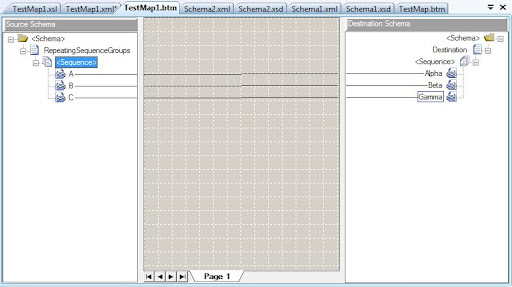
The basic map for such typical task would look pretty straightforward:
If we test this map without any modification it will produce following result:
<ns0:Destination xmlns:ns0="NS-Schema2">
  <Alpha>A1</Alpha>
  <Alpha>A2</Alpha>
  <Alpha>A3</Alpha>
  <Beta>B1</Beta>
  <Beta>B2</Beta>
  <Beta>B3</Beta>
  <Gamma>C1</Gamma>
  <Gamma>C3</Gamma>
</ns0:Destination>
The original order of the elements inside sequence is lost and that's not what we want. Default behavior of the BizTalk 2009 and 2010 Map Editor is to generate compatible map with older versions that did not have ability to preserve sequence order. To enable this feature simply open map file (*.btm) in text/xml editor and find attribute PreserveSequenceOrder of the root <mapsource> element. Set its value to Yes and re-test the map:
<ns0:Destination xmlns:ns0="NS-Schema2">
  <Alpha>A1</Alpha>
  <Beta>B1</Beta>
  <Gamma>C1</Gamma>
  <Alpha>A2</Alpha>
  <Beta>B2</Beta>
  <Alpha>A3</Alpha>
  <Beta>B3</Beta>
  <Gamma>C3</Gamma>
</ns0:Destination>
The result is as expected – all corresponding elements are in the same order as in the source document. Under the hood it is achieved by using one common xsl:for-each statement that pulls all elements in original order (rather than using individual for-each statement per element name in default mode) and xsl:if statements to test current element in the loop:
  <xsl:template match="/s0:RepeatingSequenceGroups">
    <ns0:Destination>
      <xsl:for-each select="A|B|C">
        <xsl:if test="local-name()='A'">
          <Alpha>
            <xsl:value-of select="./text()" />
          </Alpha>
        </xsl:if>
        <xsl:if test="local-name()='B'">
          <Beta>
            <xsl:value-of select="./text()" />
          </Beta>
        </xsl:if>
        <xsl:if test="local-name()='C'">
          <Gamma>
            <xsl:value-of select="./text()" />
          </Gamma>
        </xsl:if>
      </xsl:for-each>
    </ns0:Destination>
  </xsl:template>
BizTalk Map editor became smarter so learn and use this lesser known feature of XSLT 2.0 in your maps and XSL stylesheets.
Read more ...

BizTalk : Q&A : Read Repeating Namepair values using XSLT for-each

Friday, March 22, 2013
Q: Hi i have a strange issue with matching specific attribute of xml node. Example code that doesnt work:
<xsl:for-each select="../../unit/service/price/season[@name=$period_name]">
     <xsl:attribute name="std_bed_price">
          <xsl:value-of select="../@amount"/>
     </xsl:attribute>
</xsl:for-each>
Example code that DOES work but i don't like this way too much:
 <xsl:for-each select="../../unit/service/price/season">
     <xsl:if test="@name = $period_name">
          <xsl:attribute name="std_bed_price">
               <xsl:value-of select="../@amount"/>
          </xsl:attribute>
     </xsl:if>
 </xsl:for-each>
If in first example i replace the variable name with some of the values like 'A' it works, i also tested what variable name is selected and it has the correct data inside (so, 'A','B','C' ...)
Anyone had this problem before?

A: You might try changing it to an apply-templates instead of a foreach. Something like the following should work.
<xsl:template match="price">
    <xsl:attribute name="std_bed_price">
        <xsl:value-of select="@amount" />
    </xsl:attribute>
</xsl:template>
And then call it like:
<xsl:apply-template select="../../unit/service/price/[season/@name=$period_name]" />
or

select="../../unit/service/price/season[./@name=$period_name]
Read more ...

BizTalk - Testing Pipeline Components Approaches

Friday, March 15, 2013

We will begin this post by discussing some of the traditional ways I have seen pipeline components tested, then continue to 2 more recent techniques which I believe to offer significant advantages.  To begin with the traditional techniques are: 
Traditional Approach 1 - Testing as part of a larger process
In this technique the Pipeline component is developed and then deployed along with a BizTalk solution.  Tests are then conducted against the overall process and it is assumed that if the end to end test is successful then the pipeline component has been adequately tested.
The key points about this approach are:
  • Often problems with the pipeline component are not detected during development because the end to end test does not cover all cases in the component
  • It is difficult to obtain code coverage information for the pipeline component
  • It is time consuming as it requires a deployment to BizTalk to be able to test
  • It is error prone because often you forget to restart host processes and think you havent fixed something that you really have
  • The component has limited reusability as it is only tested within the context of this process
Traditional Approach 2 - Using abstraction to make the component more testable
In this technique you find the developer has abstracted the logic using the facade pattern which the pipeline component then uses.  This means the code in the pipeline component is as simple as possible.  The more complex code is in other classes which do not depend on the BizTalk classes and interfaces such as IBaseMessage.  This in turn makes these classes easier to test outside BizTalk.
I think this pattern in general isnt a bad thing.  but I often see this technique used in conjunction with technique 1.  So we end up with a situation where the underlying classes are tested with unit tests and the pipeline component itself is assumed as tested as part of the larger process.  The key points of this technique are:
  • It is better than technique 1 as we are performing some unit tests which validates most of the functionality of the component before BizTalk becomes involved
  • We still cant test the pipeline component interface without having to deploy to BizTalk
  • Most of the other points from technique 1 still apply
Traditional Approach 3 - Using Pipeline.exe
I sometimes have seen the technique where a developer will create the pipeline component and then some pipelines.  The developer will then use Pipeline.exe to execute the test cases. 
The key points of this approach are as follows:
  • This does not require the artifacts to be deployed to BizTalk
  • It requires additional BizTalk pipelines to be defined to test the pipeline component
  • This tool needs to be used from the command line (although you could use the process object to call it from a C# test)
  • When using this approach you would probably want to validate the output document from the pipeline.exe call to ensure the message is as expected
  • You cant really interact with the message context before or after the test so this might limit your testing capability or require additional components needing to be added to the pipeline.
The challenge of the traditional approaches
The main challenge which limited the traditional approach to how you would test pipeline components was the ability for the developer to create and setup the IBaseMessage and IPipelineContext objects which you would then use for testing.  This resulted in the above 3 approaches being (in my opinion) the most popular way of testing pipeline components.
As result developers were often making their best effort at being able to test pipeline components but always knowing that they could only effectively test so much and there was always a reasonable chance that the component is going to have problems when used.
Newer Approachs
As with previous posts in this series I'm trying to encourage the following desired practices when testing:
  • We want to make testing the component relatively simple
  • We want to test the component as much as possible before we start using it in BizTalk
  • We want the tests to be automated and part of a continuous integration process
In order to implement the approach to testing pipeline components I would recommend either of the following 2 techniques (outlined below) when testing pipeline components.  Before I discuss the two techniques some background on the sample (available for download at the bottom of the article):
The sample contains a simple pipeline component which will read the input message using the XPathMutatorStream.  When it finds an element matching the desired XPath query the value from this element will be promoted to the File.ReceivedFileName promoted property.
The sample pipeline component is intended to be a fairly straightforward component which can be used to demonstrate how to test a component.  The following picture shows the main part of the pipeline component:
In the tests project there are 2 test classes each one demonstrating each technique.
Approach 1 - Testing with the Pipeline Component Test Library
The Pipeline Component Test Library has been around for a little while, but I dont think its used as much as it should be.  The library basically provides a simpler API to the PipelineObjects.dll which comes with the Pipeline.exe tool in the SDK.
This means you can interact with the Pipeline.exe type facilities in a simpler way directly from your C# test.  You can also access the message and its context much easier than you would be able to by using Pipeline.exe.  The following picture shows the code snippet which forms the test of the pipeline component using the pipeline component test library:
 
 In the test you can see you use the Pipeline Library to help tackle the key challenges of the IBaseMessage and the IPipelineContext.  In terms of the message you use the libraries helpers to create this message from an input document.  For the IPipelineContext this is handled by the library internally because you are creating a pipeline in code to execute the component in.
The advantages of this technique are:
  • You have full access to the proper IBaseMessage before the test.  This lets you remove the dependancy on things like components before yours in a pipeline or adapters because you can do things like set properties yourself.
  • The technique uses objects that a BizTalk person will be familiar with so the learning curve is not that steep
  • The tests can be developed very quickly
  • You control the pipeline so you can add additional components as required
With this technique it allows you to treat the pipeline component like a black box.  You put a message in and check the message and context that comes out. 
Useful Resources:
Some useful resources on this technique are:
Tomas Restrepo  - Creator of the Pipeline Component Test Library
Nick Heppleson - Has an article on how he tests his Message Archive component using this technique
Approach 2 - Testing with Rhino Mocks
In approach 2 i'm going to demonstrate how you can use a mocking framework to help you test the pipeline component.  In this example I am using Rhino Mocks.  In this technique you are basically defining a dynamic mock for the objects which will be used by the pipeline component.  On the mock objects you set expectations for what should happen each time a method is called on the mock object.  You then execute the pipeline component and then verify that all of the expectations happened as you planned.
The below code sample shows the equivelent test implemented using Rhino Mocks.
 

The advantage of this technique is:
  • It is a very powerful technique which gives you full control over pretty much all of the objects
  • It is a technique which is common to C# developers
  • Encourages the developer to think more about the component
  • Again this does not require the code to be deployed to BizTalk
This technique is much more white box, requiring the developer to have a much more intermate knowledge of what the component is doing when creating the test or as we are all test driven developers this makes you think a little harder about what the component does internally.   
Useful resources:
For more info on BizTalk and Rhino Mocks check out the following (click here)
Summary
 I think the key differences between the pipeline component test library and Rhino Mock techniques are as follows (i will refer to the pipeline component test library as PCTL):
  • The PCTL offers a technique which has a shallower learning curve and will be familiar to most BizTalk developers
  • Rhino mocks offers probably more control over things for very complicated tests
  • The PCTL is a much quicker way of developing tests, i find that using Rhino Mocks is quite time consuming in working out all of the expectations (especially when you are new to the technique)
  • It would be easier to refactor PCTL tests when there are changes to your component
  • In my opinion the PCTL just gives me a little more confidence than Rhino Mocks.  This is mainly because the test technique gives me the gut feeling that it is performing like how it will in BizTalk.  Where as with Rhino Mocks it sometimes feels that there is a bit of a gap between the mocking and what will happen when it is in BizTalk.  I dont really have any hard evidence to back this up but I think the fact that the tests themselves are that bit more complicated to write that they almost need testing in their own right.
So based on this article I would make the following recommendations for your approach to testing pipeline components:
  1. Use the traditional abstraction technique anyway as this is a pattern that can make your component simpler to understand and test
  2. As a default technique use the Pipeline Component Test Library
  3. When you have a special case or unusual component that has advanced testing requirements, compliment the Pipeline Component Test Library tests with ones which use Rhino Mocks to help you do those more advanced things
  4. Use a code coverage tool to ensure you dont miss any tests
  5. Remember to test more than just the core interface such as IComponent as the rest of the code needs testing too!
Read more ...